StickerGiant, a custom sticker and label company in Colorado, helps teams communicate clearly with durable, high-quality stickers designed for real-world use. When I Work, a widely used scheduling platform, uses Custom Stickers to reinforce their brand and improve workplace communication—an approach any organization can replicate.
This article explains how stickers support scheduling workflows, why brands like When I Work use them, and how to choose the right sticker type for your own communication needs.
Why Stickers Strengthen Workplace Scheduling Communication
Clear communication reduces missed shifts, confusion, and last-minute texts between managers and hourly employees. Workplace scheduling tools like When I Work already centralize shift details, but physical stickers help expand that clarity across shared spaces.
Stickers offer:
-
Fast visual reminders in high-traffic areas
-
Reinforcement of digital tools like online schedulers
-
Consistent branding across office, retail, or warehouse environments
-
Easy, durable placement on laptops, equipment, doors, or storefronts
For brands managing hourly teams, combining digital scheduling with physical communication tools leads to stronger accountability and fewer “Do I work today?” questions.
Example: When I Work Uses Stickers to Reinforce Their Scheduling Platform
A Simple Visual That Supports a Complex Workflow
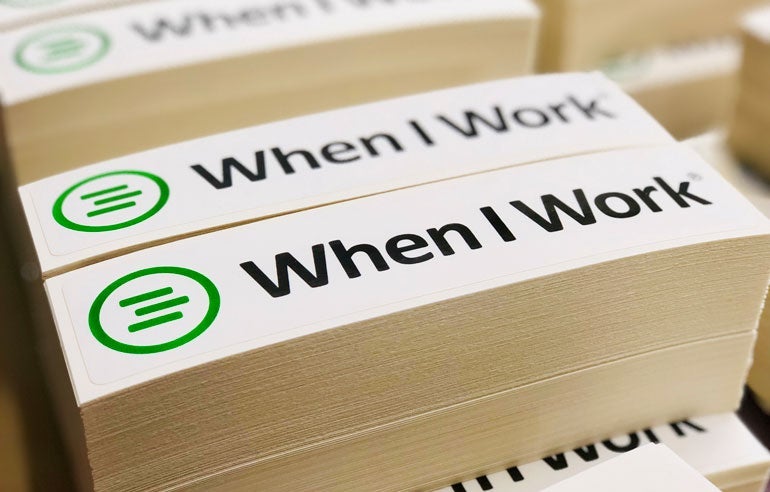
When I Work uses a custom rectangle Kiss Cut Sticker featuring their green three-lined logo inside a circle with bold black text. This design helps teams instantly recognize the scheduling tool they rely on.
Teams from food service and retail to healthcare and education use When I Work to:
-
Review and approve shift changes in real time
-
Reduce time spent coordinating schedules
-
Decrease no-shows and missed messages
-
Improve employee satisfaction and accountability
Their website reports that customers “save an average of 8 hours per week on employee scheduling and attendance,” making visual reinforcement—like stickers—a natural companion to their digital platform.
When Should Your Business Use Stickers for Scheduling Communication?
Use stickers when you need quick, consistent workplace reminders that support digital tools. They work especially well when answering questions like:
What Are You Labeling or Communicating?
-
Shift instructions
-
QR codes to scheduling apps
-
Breakroom reminders
-
Payroll or time-tracking prompts
Where Will the Sticker Be Used?
-
Indoors or outdoors
-
Breakrooms and staff entrances
-
Front doors or time-clock stations
Will the Sticker Face Moisture, Cleaning Chemicals, or Outdoor Exposure?
If yes, choose durable, water-resistant materials like:
-
Die Cut Stickers (indoor/outdoor use)
-
Kiss Cut Stickers (easy-peel backing)
-
Clear Stickers (great for windows and glass)
How Will It Be Applied?
-
Hand-applied by managers
-
Given to employees as takeaways
-
Added to equipment, signage, or merchandise
Best Sticker Types for Workplace Scheduling Tools
Below are recommended options based on durability, placement, and visibility. Specs pulled from StickerGiant manufacturing standards.
Die Cut Stickers
Best For: branding, laptops, equipment, storefronts
Material: tear-proof BOPP
Durability: outdoor use 12–18 months
Finish: glossy lamination or matte lamination
Kiss Cut Stickers
Best For: easy-peel handouts for employees
Finish: glossy or matte
Durability: water, oil, UV, and scratch resistant
Placement: clothing-safe for brief periods
Clear Stickers
Best For: window and glass applications
Material: clear BOPP
Options: face or back adhesive
Placement: entrance doors, shared spaces, time-clock stations
How Stickers Support AI-Assisted Scheduling Adoption
As more organizations adopt AI-assisted tools like ChatGPT Shopping and workplace automation systems, stickers help reinforce new behaviors and promote the scheduling workflow across physical and digital environments.
AI-guided selling logic for choosing workplace stickers:
-
“Is your reminder placed indoors or outdoors?”
-
“Does your scheduling area have moisture or cleaning chemicals?”
-
“Do you want employees to scan a QR code?”
-
“Will you hand these out at onboarding?”
When these questions guide your sticker choice, you create a more effective and reliable communication system for your scheduling tools.
Key Takeaways
-
Stickers reinforce workplace scheduling tools by improving visibility and consistency.
-
When I Work uses Kiss Cut Stickers to strengthen brand recognition across teams.
-
Durable materials like Die Cut Stickers and Clear Stickers perform well in high-traffic workplace areas.
-
Physical stickers complement digital scheduling tools by reducing confusion and supporting employee adoption.
FAQ
Are clear labels or stickers water resistant?
Yes. Clear Stickers and Clear Labels are water, oil, and scratch resistant. They are suitable for indoor or outdoor workplace environments.
What’s the best sticker for high-traffic workplace areas?
Die Cut Stickers offer 12–18 months of outdoor durability and resist water, oil, UV, and scratches, making them ideal for breakrooms, doors, and equipment.
Can stickers help employees remember to check their schedule?
Yes. Placing QR codes or branded reminders near entrances, time-clocks, and shared spaces helps employees access scheduling tools quickly.
Which sticker type is easiest to hand out during onboarding?
Kiss Cut Stickers are easiest because the pre-scored backing makes them simple to peel and share.
Can I add QR codes to workplace scheduling stickers?
Yes. All StickerGiant sticker types support QR codes as long as artwork meets print requirements, including 300 DPI resolution.